
Level Goal
The password for the next level is stored in the file data.txt, which is a hexdump of a file that has been repeatedly compressed. For this level it may be useful to create a directory under /tmp in which you can work using mkdir. For example: mkdir /tmp/myname123. Then copy the datafile using cp, and rename it using mv (read the manpages!)
This is a long one and we will become best friends with the file command.
The first file we get is data.txt, which is a hex dump file.
We are going to need a directory to work in for this, so let’s go ahead and use mktemp -d and then copy over our data file.
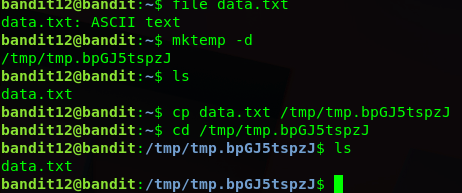
We are going to use file to determine the type of file it is.
Depending on the compression, we will need to change the name and decompress the file.
This level used 3 different compression tools:
gzip (.gz)
bzip (.bz)
tar (.tar)

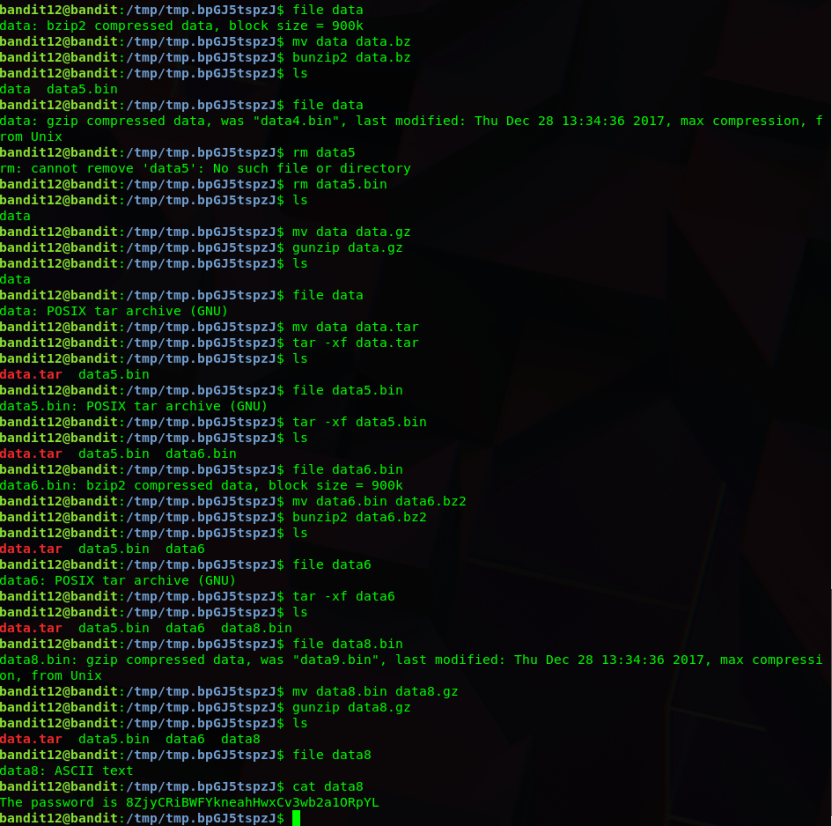
After lots of decompressing, we finally get our text file!
 Killian Sherer