
Level Goal
Logging in to bandit26 from bandit25 should be fairly easy… The shell for user bandit26 is not /bin/bash, but something else. Find out what it is, how it works and how to break out of it.
This one took me a little longer, but once I figured it out it made sense.
When we first log in, we get a banner and then get kicked out of the session.
We know that we are being dropped into a different shell, so it would be very helpful to know what that shell is and what it does.
If we look at bandit26’s entry /etc/passwd we can see what shell is being used.
In thiss case, the shell being called is /usr/bin/showtext.
If we cat that file, we see that the more command is being used to open ~/text.txt.
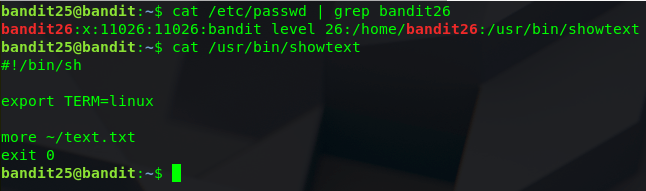
We do not have permission to look at that file or edit it, so I suppose we will have to look at the more command.

Doing some digging into the more command, I found this
v
Start up an editor at current line. The editor is taken from the environment variable VISUAL if defined, or EDITOR if VISUAL is not defined, or defaults to “vi” if neither VISUAL nor EDITOR is defined.
Knowing this, we can try to open vi and then open the bandit26 password file.
The only problem we have now is the shell automatically closes after we open it.
If the text is longer than what can be displayed on the screen, we will be able to force more to wait before closing.
I made my terminal as small as I could in regards to the number of lines displayed, this way I can only see 5 lines at a time, less than what the banner is, and connected to bandit26.

It looks like that worked, stopping the shell from kicking us out right away.

Now we press v to open VI (after doing this, I found we could enlarge the terminal again and navigate to the end of the text to make things look nicer.
Next we need to read a file from within VI – :r will let us do just that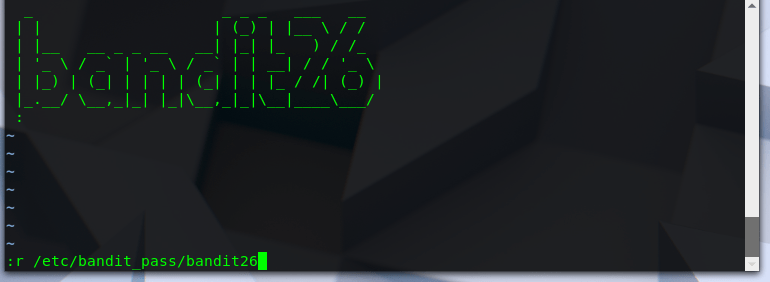
There we go, we have the flag!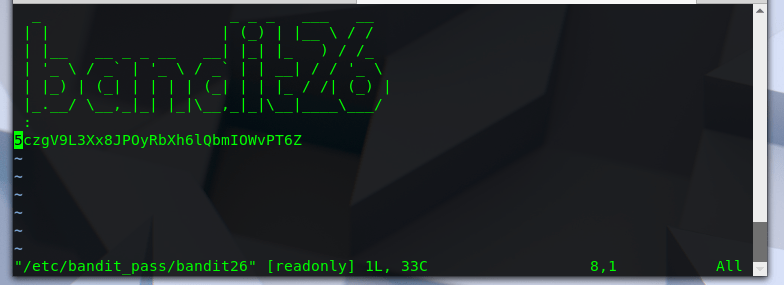
 Killian Sherer