
Tonight I am going to build out a lab machine with Sysmon and connect it to Microsoft Sentinel and do some detection testing.
To start, I will download and install sysmon using the sysmon config provided by BHIS: https://github.com/blackhillsinfosec/EventLogging/blob/master/DEFCON3/sysmon/sysmonconfig.xml

After that is done, I installed Chrome just to get some sample data


And we can see the logs for Chrome in the sysmon logs

Next I will run the Install script to get this machine connected to Azure ARC


I then set up Windows Forwarded Events. I did windows security events in the past and it was not the correct table for sysmon.
(After running through this I learned this is not correct either and the logs need to be added through a data collection rule directly, NOT in Sentinel.)


Yay symon logs!
After doing this I realized that the WindowsEvents from Windows Forwarded Events is also not correct, so I needed to go back and make a DCR in Azure itself and add the Data Sources and Resources.
It’s strange because it specifically says not to do this but the sysmon parser requires the EVENT table, not WindowsEvent…
I am leaving the above in case anyone else is having the same issue I was having.
Set up new Data Source in DCR


This is the page that says not to do what I am doing… Use Windows security events to avoid…
However, sysmon parsers do not work with Windows Security Events as the scheme is off.

Add Custom XPath:
Microsoft-Windows-Sysmon/Operational!*
Follow instructions for sysmon parser here: https://github.com/netevert/sentinel-attack/wiki/Onboarding-sysmon-data-to-Azure-Sentinel
https://github.com/netevert/sentinel-attack/blob/master/parser/Sysmon-OSSEM.txt

I also added bunch of new ANalytic Rules for sysmon from here
https://github.com/netevert/sentinel-attack/tree/master/detections
Now that we have sysmon set up with some analytic rules and parsers, let’s mess around with some fake malware and see the logs.


Now we have some sample malicious activity that we should be able to see in Sentinel

And we do!
Let’s dig in and find the script that ran to start the reverse shell and get the attacker IP.

And from this event, we can find the PID, and filter by that to see more activity

We can then test out filtering by parent process ID and see the malicious activity

And we have some incidents triggered
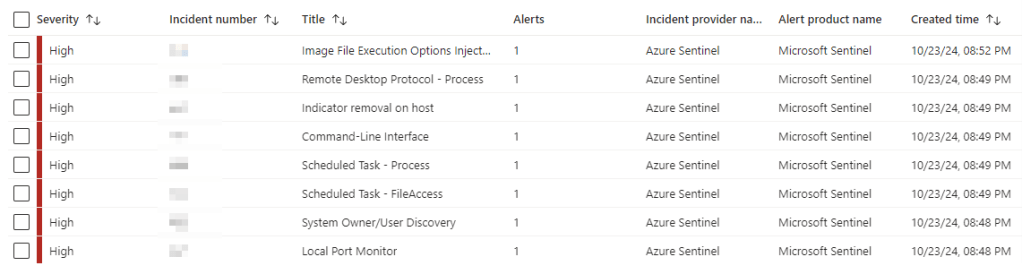
A lot of these are not actually related to our malicious activity, so this is not something you would want to ship directly to production, but we do at least get a couple good detections

 Killian Sherer